

Simply Piano: Learn Piano Fast
Simply Ltd
I approached Simply Piano: Learn Piano Fast as someone starting with a very practical question: can an app turn a few spare minutes and an ordinary piano or keyboard into a useful learning routine? After working through its lessons, song practice, and feedback flow, my answer is yes, with an important qualification. It is strongest when you want a friendly path into playing, not when you need the depth or personal correction of a private teacher.
This is a free Education app from Simply Ltd, rated for Everyone. It has reached over 50 million installs, with an average rating of 4.6 from around 933 thousand ratings. Those figures make sense to me because the app removes much of the intimidation that makes beginners postpone learning. You do not need to begin by decoding a thick theory book or searching through disconnected videos. The experience is arranged as a sequence, and that sequence gives a new player a clear next action.
The app is available for devices running Android 6.0 or later, and its current version is 7.30.21. Optional in-app purchases range from $0.99 to $314.99 per item, so the word “free” should be understood as a way to start rather than a promise that every learning path is unlocked indefinitely. I would install it for the introductory experience, then decide whether the paid material fits my goals before treating it as a long-term course.
From an untouched keyboard to a repeatable practice routine
The starting point: making the first session feel manageable
The most valuable thing Simply Piano does at the beginning is reduce the number of decisions competing for your attention. A complete beginner often wonders where to place the hands, which notes matter first, whether reading music is required, and what to practise after the first exercise. The app gives those questions an order. That matters more than it may sound: a lesson that is technically simple can still fail if the learner has to design the entire study plan alone.
I found the song-led approach especially useful for motivation. Instead of making every early exercise feel like an abstract drill, the app connects progress with music that feels recognisable and playable. That creates a small but important psychological handoff: the learner moves from “I am studying piano” to “I am actually playing a part of a song.” For someone who needs a visible reason to return tomorrow, that is more persuasive than a page of theory.
Related News

Why WhatsApp Messenger Still Makes Everyday Communication Feel Easy

Jurassic World: The Game Is the Better Dino Tycoon for Strategic Players

Threads in Real Life: Who Should Join, Lurk, or Leave

How SHEIN Turned Shopping Into an Endless Content Feed

How to Make Fortnite Feel Smarter on Mobile

Should You Switch to Microsoft Outlook on Mobile?
Before starting, I would make the physical setup part of the routine. Put the phone or tablet where the screen is easy to see without twisting your neck, sit close enough to reach the keys naturally, and use a quiet room if possible. The app depends on hearing your playing, so a noisy television, loud conversation, or heavy background sound can make the feedback less dependable. This is not a flaw unique to one lesson; it is a basic condition of using an audio-listening learning tool.
A useful beginner habit is to keep the first session deliberately short, even if the lesson feels easy. The goal is not to prove that you can finish a large amount of content. It is to establish a loop: open the lesson, read the prompt, play slowly, notice the feedback, and repeat the difficult measure. That loop is the real starting skill. Without it, a learner may rush through several screens and remember very little the next day.
Following the lesson flow instead of guessing what to practise
Once a lesson begins, the app’s main job is to connect what appears on screen with what your fingers do on the keyboard. The visual guidance helps translate notation into an immediate physical action. For a first-time player, that is less overwhelming than trying to coordinate a book, a video, and a separate piano at the same time.
Gallery
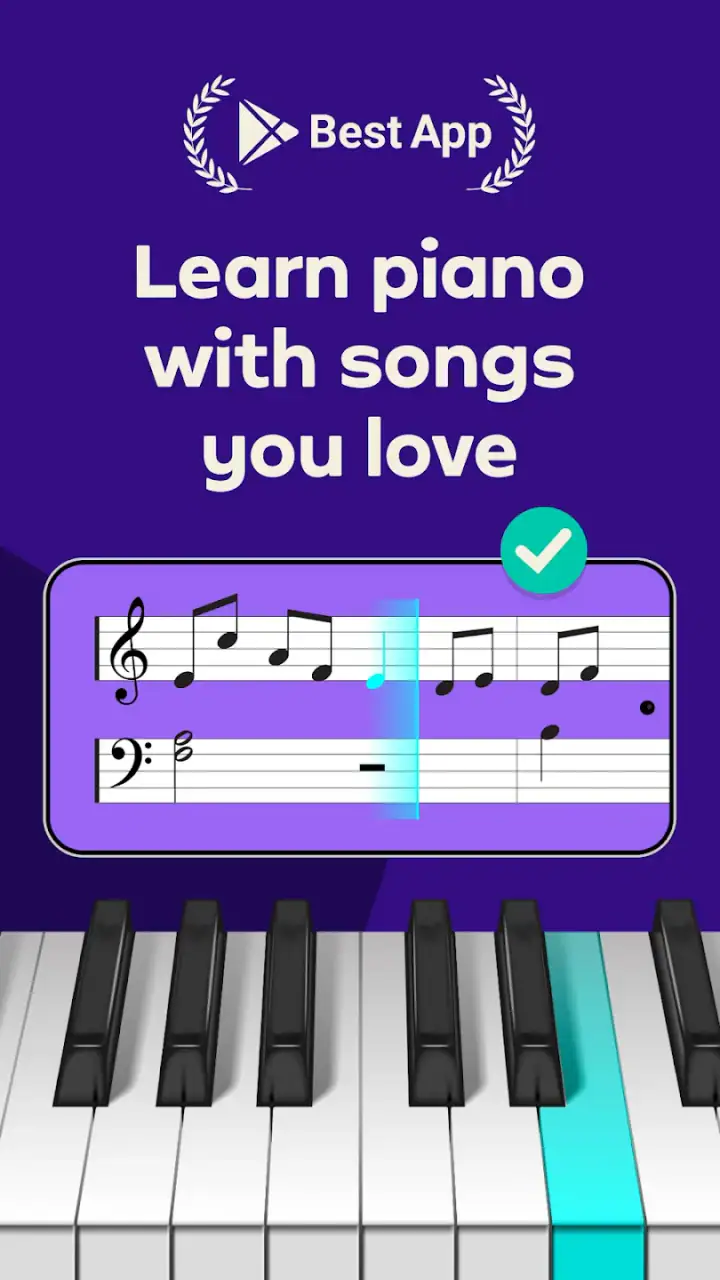
I recommend treating each exercise as a listening test as well as a reading test. Look at the upcoming notes, but also pay attention to whether the rhythm feels even and whether the hand is relaxed. Beginners often focus so intensely on hitting the correct keys that they ignore tension in the wrist or lift the fingers too high. The app can guide the musical task, but it cannot replace your own awareness of posture and comfort.
The feedback system is most useful when I use it diagnostically rather than emotionally. A missed note is information about timing, position, or attention; it is not a verdict on whether I am “musical.” If a passage repeatedly causes trouble, I slow it down and isolate the transition instead of replaying the whole song at the same speed. That workflow saves time and prevents the common beginner mistake of practising an error until it feels automatic.
Another practical tip is to separate recognition from performance. First, glance through the short passage and identify where the hand moves. Then play it slowly enough to stay ahead of the notes on screen. If I wait until the last moment to read every symbol, my fingers react late and the exercise becomes a cycle of catching up. Looking slightly ahead turns the lesson into a coordination exercise rather than a memory test.
How songs hand learning over to motivation
The song catalogue is not merely decoration around the lessons. It gives the course an outcome that beginners can feel. A learner who has spent time on note recognition, rhythm, and hand movement can test those skills in a musical context. That handoff is where the app is more engaging than many traditional beginner methods, which may explain a concept clearly but leave the student wondering when it will become music.
Still, song practice can expose a weakness in a self-guided system. A familiar melody may tempt you to play by memory or by ear while ignoring the notation. That can feel successful in the moment, but it does not necessarily strengthen reading. I would alternate between looking carefully at the displayed notes and occasionally listening to the phrase as a whole. The first builds reading discipline; the second helps develop musical shape.
For a parent helping a child, the songs also create a natural checkpoint. Rather than asking whether the child “finished a lesson,” listen for one small phrase played with a steady pulse. That is a more meaningful result than counting screens. Because the content rating is Everyone, the app is suitable for a broad family audience, but younger learners may still need an adult to help with setup, patience, and realistic practice expectations.
The handoffs between app, instrument, and learner
The learning process has three moving parts: the app presents the task, the instrument produces the sound, and the learner interprets the result. If any handoff is weak, progress feels inconsistent. A screen can show the right note, but the learner still needs to find it physically. The keyboard can produce a sound, but the learner must decide whether the timing and movement were correct. The app can respond, but the learner must turn that response into a better attempt.
This is why I would not use Simply Piano while multitasking. It is not the kind of app that works well in the background while you check messages. The value comes from the immediate exchange between instruction and playing. Put the phone away from distractions, silence notifications when possible, and give each exercise enough attention to understand why a mistake happened.
The instrument itself also affects the experience. A full piano or keyboard makes the visual and physical relationship easier to understand, while a cramped or poorly positioned instrument can make hand movement uncomfortable. I would not purchase expensive equipment solely to begin with the app. Start with what is available, but make sure the keys are accessible and the room is quiet enough for the app to hear the performance clearly.
There is a second handoff that matters after the lesson: transferring app progress into independent playing. I like to end a session by repeating one phrase without staring continuously at the screen. That reveals whether I learned the movement or merely followed prompts moment by moment. If the phrase falls apart immediately, I return to the lesson; if it holds together, I try it again with more attention to rhythm and expression.
A realistic everyday workflow
Imagine arriving home after work with about fifteen minutes before dinner. I would choose one unfinished lesson rather than opening the app without a plan. For the first few minutes, I would review the displayed pattern slowly and play it at a comfortable pace. I would then attempt the complete exercise once, note the exact transition that causes hesitation, and spend the remaining time repeating that transition instead of restarting from the beginning every time.
On the following day, I would begin with the same transition before moving forward. This creates a useful bridge between sessions. It also prevents the false impression that progress means constantly unlocking new material. A small passage played accurately and comfortably is a better outcome than several new exercises played with rushed timing.
For someone with more time, the routine can have three parts: a short review, one new lesson, and a song application. I would keep the review because finger patterns fade quickly when a beginner only moves forward. I would keep the song because it supplies motivation. The new lesson matters, but it should not consume every minute if the learner cannot yet use the idea in music.
What the result looks like in practice
The realistic result is not instant fluency. It is a clearer relationship with the keyboard and a growing ability to follow simple musical instructions without feeling lost. The app is good at producing that early momentum. It gives me a reason to sit down, a defined task once I sit down, and a way to notice improvement from one attempt to the next.
That makes it a strong choice for adults who have always wanted to try piano but feel embarrassed by their lack of background. It also suits learners who prefer visual guidance and short, structured activities. If you enjoy songs and need encouragement to practise consistently, the app’s design is likely to feel more welcoming than starting with scales and theory alone.
It is less suitable for a player who already reads music comfortably and wants advanced technique, detailed interpretation, or a carefully customised curriculum. A teacher can watch the hand, hear the tone, adjust posture, and respond to musical goals in a way an app cannot. A traditional method book may also be better for someone who wants a complete reference they can annotate and revisit without relying on a screen.
Compared with random tutorial videos, Simply Piano offers a more coherent route. Videos can be excellent when you already know exactly what you need, but they often leave beginners choosing the next topic themselves. Compared with a private teacher, the app is cheaper to begin and easier to use at any hour, but it gives less personal correction. Compared with a metronome or a basic keyboard app, it provides a fuller learning path rather than only one practice tool.
Where the flow breaks and how to work around it
The first point of friction is audio recognition. If the room is loud or the instrument is difficult for the device to hear, feedback may not match what you believe you played. When that happens, I would not immediately assume the lesson is beyond my ability. I would quiet the surroundings, reposition the device, play with a clearer attack, and repeat the phrase slowly. The app is most useful when the input it receives is clean.
The second break occurs when the learner treats the feedback as the entire teacher. A green result or a successful passage does not automatically mean the hands are relaxed, the rhythm is expressive, or the fingering will remain comfortable at a faster speed. I use the app for immediate guidance, then make my own physical and musical checks. That combination produces a more reliable practice habit.
Access to paid material is another consideration. The app is free to download and start, but the available purchases can become substantial depending on what you choose. I would first establish a routine with the accessible content, then compare the cost of continuing with the value I am actually receiving. If I only practise once every few weeks, a large commitment is difficult to justify. If the app becomes a regular part of my week, the calculation changes.
There is also a motivational break that affects many learning apps: the novelty can fade. Songs may get the learner started, but consistency eventually depends on a personal reason to continue. I would connect practice to a concrete goal, such as accompanying a simple melody, becoming comfortable with both hands, or playing for family. Without that goal, even a well-designed sequence can become another unused app on the phone.
Who should choose it, and who should look elsewhere
I would recommend Simply Piano to a complete beginner who wants a guided first step, enjoys learning through songs, and can create a reasonably quiet practice space. It is particularly helpful for people who need structure more than theory at the beginning. The app turns an intimidating instrument into a series of manageable actions and gives the learner a visible path from first notes toward simple musical performance.
I would hesitate to recommend it as the only resource for someone preparing for formal examinations, pursuing advanced classical technique, or struggling with pain and posture. Those situations call for individual assessment and more detailed instruction. I would also look elsewhere if my main interest were composing, improvising, or understanding harmony deeply; the app’s beginner-friendly route is not the same as a comprehensive musicianship course.
My final judgement is positive, but measured. Simply Piano succeeds because it handles the hardest early handoff: turning the intention to learn into an actual session at the keyboard. Its strongest feature is not any single exercise; it is the complete loop of instruction, playing, feedback, and musical reward. Its limitations appear when that loop is treated as a substitute for listening carefully, practising independently, or receiving human correction.
For me, the best way to use it is as a dependable starting framework. Keep sessions focused, isolate troublesome transitions, use songs to check whether lessons are becoming music, and reassess paid access only after a real practice habit exists. Used that way, this Education app offers a friendly and practical entry into piano, while leaving room for a teacher, method book, or more specialised tool when your ambitions grow beyond the beginner stage.
FAQs for Simply Piano: Learn Piano Fast
What is Simply Piano and how does it work?
Simply Piano is an educational app designed to help users learn piano at their own pace. It features interactive lessons, real-time feedback, and a variety of songs to play. Using your device's microphone, it listens to your playing and provides instant feedback to help improve your skills.
Is Simply Piano suitable for beginners?
Yes, Simply Piano is ideal for beginners. It starts with basic lessons that don't require any prior musical knowledge. The app gradually introduces more complex concepts, making it a great choice for those just starting their piano journey. It also offers advanced lessons for more experienced players.
What devices are compatible with Simply Piano?
Simply Piano is available for both Android and iOS devices. It requires a smartphone or tablet with a functioning microphone to pick up the sound of the piano or keyboard. Make sure your device meets the app's system requirements to ensure the best performance.
Is there a cost associated with using Simply Piano?
Simply Piano offers a free version with limited access to lessons. For full access to all features, users need to subscribe to a paid plan. Subscription details, including pricing and duration options, can be found within the app. It’s advisable to explore the free version first to see if it meets your needs.
Can Simply Piano be used with any keyboard or piano?
Yes, Simply Piano is compatible with both acoustic and digital pianos. As long as the instrument is properly tuned and the device’s microphone can clearly capture the sound, the app will provide effective feedback. This flexibility makes it accessible to a wide range of users with different instruments.
Pros
- User-friendly interface for beginners.
- Wide range of songs to learn.
- Real-time feedback on performance.
- Adaptive learning based on skill level.
- Offline mode for practice anywhere.
Cons
- Requires paid subscription for full access.
- Limited advanced lessons for pros.
- Occasional app crashes reported.
- Song library lacks some popular hits.
- No option for MIDI keyboard integration.


